<!DOCTYPE html>
    <html lang="vi" xmlns="http://www.w3.org/1999/xhtml" prefix="og: http://ogp.me/ns#">
    <head>
<title>Thủ thuật xóa bộ nhớ drive tạo tài khoản drive google one không giới hạn dung lượng</title>
<meta name="description" content="Thủ thuật xóa bộ nhớ drive tạo tài khoản drive google one không giới hạn dung lượng - Savefile - Tin Tức -...">
<meta name="author" content="Mua Bán tài khoản Google Drive , One, Unlimited không giới hạn dung lượng">
<meta name="copyright" content="Mua Bán tài khoản Google Drive , One, Unlimited không giới hạn dung lượng [webmaster@tochucteambuildingtour.com]">
<meta name="generator" content="NukeViet v4.5">
<meta name="viewport" content="width=device-width, initial-scale=1">
<meta http-equiv="Content-Type" content="text/html; charset=utf-8">
<meta property="og:title" content="Thủ thuật xóa bộ nhớ drive tạo tài khoản drive google one không giới hạn dung lượng">
<meta property="og:type" content="website">
<meta property="og:description" content="Savefile - Tin Tức -...">
<meta property="og:site_name" content="Mua Bán tài khoản Google Drive , One, Unlimited không giới hạn dung lượng">
<meta property="og:url" content="https://bangoogledrivekhonggioihantaikhoan.com/savefile/Tin-tuc/thu-thuat-xoa-bo-nho-drive-tao-tai-khoan-drive-google-one-khong-gioi-han-dung-luong-627.html">
<link rel="shortcut icon" href="https://bangoogledrivekhonggioihantaikhoan.com/uploads/favico.png">
<link rel="canonical" href="https://bangoogledrivekhonggioihantaikhoan.com/savefile/Tin-tuc/thu-thuat-xoa-bo-nho-drive-tao-tai-khoan-drive-google-one-khong-gioi-han-dung-luong-627.html">
<link rel="alternate" href="https://bangoogledrivekhonggioihantaikhoan.com/rss/" title="Tin Tức" type="application/rss+xml">
<link rel="alternate" href="https://bangoogledrivekhonggioihantaikhoan.com/rss/Tin-tuc/" title="Tin Tức - Tin tức" type="application/rss+xml">
<link rel="alternate" href="https://bangoogledrivekhonggioihantaikhoan.com/rss/San-pham/" title="Tin Tức - Sản phẩm" type="application/rss+xml">
<link rel="alternate" href="https://bangoogledrivekhonggioihantaikhoan.com/rss/Doi-tac/" title="Tin Tức - Đối tác" type="application/rss+xml">
<link rel="alternate" href="https://bangoogledrivekhonggioihantaikhoan.com/rss/Tuyen-dung/" title="Tin Tức - Tuyển dụng" type="application/rss+xml">
<link rel="preload" as="style" href="https://bangoogledrivekhonggioihantaikhoan.com/assets/css/font-awesome.min.css" type="text/css">
<link rel="preload" as="style" href="https://bangoogledrivekhonggioihantaikhoan.com/themes/default/css/bootstrap.min.css" type="text/css">
<link rel="preload" as="style" href="https://bangoogledrivekhonggioihantaikhoan.com/themes/default/css/style.css" type="text/css">
<link rel="preload" as="style" href="https://bangoogledrivekhonggioihantaikhoan.com/themes/default/css/style.responsive.css" type="text/css">
<link rel="preload" as="style" href="https://bangoogledrivekhonggioihantaikhoan.com/themes/default/css/news.css" type="text/css">
<link rel="preload" as="style" href="https://bangoogledrivekhonggioihantaikhoan.com/themes/default/css/custom.css" type="text/css">
<link rel="preload" as="script" href="https://bangoogledrivekhonggioihantaikhoan.com/assets/js/jquery/jquery.min.js" type="text/javascript">
<link rel="preload" as="script" href="https://bangoogledrivekhonggioihantaikhoan.com/assets/js/language/vi.js" type="text/javascript">
<link rel="preload" as="script" href="https://bangoogledrivekhonggioihantaikhoan.com/assets/js/DOMPurify/purify3.js" type="text/javascript">
<link rel="preload" as="script" href="https://bangoogledrivekhonggioihantaikhoan.com/assets/js/global.js" type="text/javascript">
<link rel="preload" as="script" href="https://bangoogledrivekhonggioihantaikhoan.com/assets/js/site.js" type="text/javascript">
<link rel="preload" as="script" href="https://bangoogledrivekhonggioihantaikhoan.com/themes/default/js/news.js" type="text/javascript">
<link rel="preload" as="script" href="https://bangoogledrivekhonggioihantaikhoan.com/themes/default/js/main.js" type="text/javascript">
<link rel="preload" as="script" href="https://bangoogledrivekhonggioihantaikhoan.com/themes/default/js/custom.js" type="text/javascript">
<link rel="preload" as="script" href="https://bangoogledrivekhonggioihantaikhoan.com/themes/default/js/bootstrap.min.js" type="text/javascript">
<link rel="stylesheet" href="https://bangoogledrivekhonggioihantaikhoan.com/assets/css/font-awesome.min.css">
<link rel="stylesheet" href="https://bangoogledrivekhonggioihantaikhoan.com/themes/default/css/bootstrap.min.css">
<link rel="stylesheet" href="https://bangoogledrivekhonggioihantaikhoan.com/themes/default/css/style.css">
<link rel="stylesheet" href="https://bangoogledrivekhonggioihantaikhoan.com/themes/default/css/style.responsive.css">
<link rel="StyleSheet" href="https://bangoogledrivekhonggioihantaikhoan.com/themes/default/css/news.css">
<link rel="stylesheet" href="https://bangoogledrivekhonggioihantaikhoan.com/themes/default/css/custom.css">
<style>
.hotline-float {
    position: fixed;
    /* right: 0; */
    bottom: 20px;
    background: url(/themes/default/images/phones.png) no-repeat center right;
    width: 250px;
    height: 90px;
    z-index: 99999999;
}
.hotline-float a {
    margin-right: 4px;
    margin-top: 0px;
    display: inline-block;
    float: right;
    padding: 46px 16px;
    font-size: 25px;
    font-weight: bold;
    color: #fff;
    z-index: 99999999;
    text-decoration: none;
}
    .zalo-container img {
  max-width: 100%;
  height: auto;
}

.zalo-container {
  position: fixed;
  width: 40px;
  height: 40px;
  bottom: 160px;
  z-index: 9999999;
}

.zalo-container:not(.right) {
  left: 2.5rem;
}

.zalo-container.right {
  right: 2.5rem;
}

.zalo-container a {
    display: block;
}

.zalo-container span {
  display: -webkit-flex;
  display: -moz-flex;
  display: -ms-flex;
  display: -o-flex;
  display: flex;
  -ms-align-items: center;
  align-items: center;
  width: 40px;
  height: 40px;
  border-radius: 50%;
  background: #1182FC;
  position: relative;
}

@keyframes zoomIn_zalo {
    from {
        opacity: 0;
        transform: scale3d(.3, .3, .3);
    }
    50% {
        opacity: 1;
    }
}

.zoomIn_zalo {
  animation-name: zoomIn_zalo;
}

.animated_zalo {
  animation-duration: 1s;
  animation-fill-mode: both;
}

.animated_zalo.infinite {
  animation-iteration-count: infinite;
}

.cmoz-alo-circle {
  width: 50px;
  height: 50px;
  top: -5px;
  right: -5px;
  position: absolute;
  background-color: transparent;
  -webkit-border-radius: 100%;
  -moz-border-radius: 100%;
  border-radius: 100%;
  border: 2px solid rgba(17, 130, 252, .8);
  opacity: .1;
  border-color: #1182FC;
  opacity: .5;
}

.cmoz-alo-circle-fill {
  width: 60px;
  height: 60px;
  top: -10px;
  position: absolute;
  -webkit-transition: all 0.2s ease-in-out;
  -moz-transition: all 0.2s ease-in-out;
  -ms-transition: all 0.2s ease-in-out;
  -o-transition: all 0.2s ease-in-out;
  transition: all 0.2s ease-in-out;
  -webkit-border-radius: 100%;
  -moz-border-radius: 100%;
  border-radius: 100%;
  border: 2px solid transparent;
  -webkit-transition: all .5s;
  -moz-transition: all .5s;
  -o-transition: all .5s;
  transition: all .5s;
  background-color: rgba(17, 130, 252, 0.45);
  opacity: .75;
  right: -10px;
}

@-webkit-keyframes pulse_zalo {
  from {
    -webkit-transform: scale3d(1, 1, 1);
    transform: scale3d(1, 1, 1);
  }

  50% {
    -webkit-transform: scale3d(1.05, 1.05, 1.05);
    transform: scale3d(1.05, 1.05, 1.05);
  }

  to {
    -webkit-transform: scale3d(1, 1, 1);
    transform: scale3d(1, 1, 1);
  }
}

@keyframes pulse_zalo {
  from {
    -webkit-transform: scale3d(1, 1, 1);
    transform: scale3d(1, 1, 1);
  }

  50% {
    -webkit-transform: scale3d(1.05, 1.05, 1.05);
    transform: scale3d(1.05, 1.05, 1.05);
  }

  to {
    -webkit-transform: scale3d(1, 1, 1);
    transform: scale3d(1, 1, 1);
  }
}

.pulse_zalo {
  -webkit-animation-name: pulse_zalo;
  animation-name: pulse_zalo;
}
</style>
<style type="text/css">
	body{background: #fff;}
</style>
    </head>
    <body>
<div id="print">
	<div id="hd_print">
		<h2 class="pull-left">Mua Bán tài khoản Google Drive , One, Unlimited không giới hạn dung lượng</h2>
		<p class="pull-right"><a title="Mua Bán tài khoản Google Drive , One, Unlimited không giới hạn dung lượng" href="https://bangoogledrivekhonggioihantaikhoan.com/">https://bangoogledrivekhonggioihantaikhoan.com</a></p>
	</div>
	<div class="clear"></div>
	<hr />
	<div id="content">
		<h1>Thủ thuật xóa bộ nhớ drive tạo tài khoản drive google one không giới hạn dung lượng</h1>
		<ul class="list-inline">
			<li>Thứ năm - 10/10/2024 09:11</li>
			<li class="hidden-print txtrequired"><em class="fa fa-print">&nbsp;</em><a title="In ra" href="javascript:;" onclick="window.print()">In ra</a></li>
			<li class="hidden-print txtrequired"><em class="fa fa-power-off">&nbsp;</em><a title="Đóng cửa sổ này" href="javascript:;" onclick="window.close()">Đóng cửa sổ này</a></li>
		</ul>
		<div class="clear"></div>
		<div id="hometext">
			Thủ thuật xóa bộ nhớ drive tạo tài khoản drive google one không giới hạn dung lượng.Các dịch vụ lưu trữ đám mây như Dropbox, OneDrive và Google Drive rất hữu ích, cho phép người dùng lưu trữ tất cả dữ liệu quan trọng lên đám mây và truy cập dễ dàng mà không cần cài đặt bất kỳ phần mềm hay chương trình nào.
		</div>
				<div class="imghome">
			<img alt="Thủ thuật xóa bộ nhớ drive tạo tài khoản drive google one không giới hạn dung lượng &#40;1&#41;" src="https://bangoogledrivekhonggioihantaikhoan.com/uploads/news/2024_10/thu-thuat-xoa-bo-nho-drive-tao-tai-khoan-drive-google-one-khong-gioi-han-dung-luong-1.webp" width="460" class="img-thumbnail" />
						<p>
				<em>Thủ thuật xóa bộ nhớ drive tạo tài khoản drive google one không giới hạn dung lượng &#40;1&#41;</em>
			</p>
		</div>
		<div class="clear"></div>
		<div id="bodytext" class="clearfix">
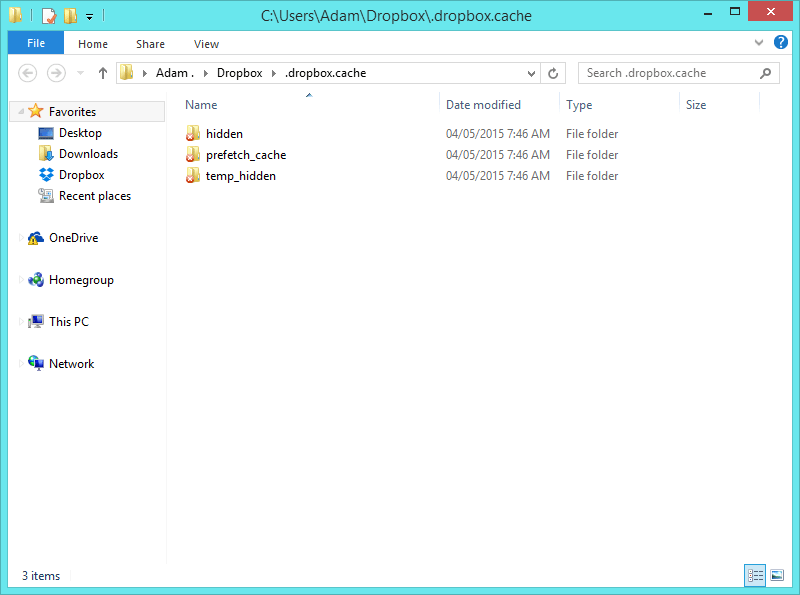
			<p>Thủ thuật xóa bộ nhớ drive tạo tài khoản drive google one không giới hạn dung lượng Các dịch vụ lưu trữ đám mây như Dropbox, OneDrive và Google Drive rất hữu ích, cho phép người dùng lưu trữ tất cả dữ liệu quan trọng lên đám mây và truy cập dễ dàng mà không cần cài đặt bất kỳ phần mềm hay chương trình nào.</p><p>Tuy nhiên, trong quá trình sử dụng, nếu bạn lưu trữ quá nhiều dữ liệu, bạn sẽ gặp phải tình trạng &quot;hết&quot; không gian lưu trữ. Khi đó, một giải pháp có thể là xóa bộ nhớ cache để giải phóng không gian.</p><p>Để xóa bộ nhớ cache trên Dropbox, OneDrive và Google Drive, hãy tham khảo bài viết dưới đây của Quản trị mạng.</p><h3>1. Dropbox</h3><figure class="image"><img style="aspect-ratio:635/476;" src="https://bangoogledrivekhonggioihantaikhoan.com/uploads/news/2024_10/thu-thuat-xoa-bo-nho-drive-tao-tai-khoan-drive-google-one-khong-gioi-han-dung-luong-1.webp" alt="Thủ thuật xóa bộ nhớ drive tạo tài khoản drive google one không giới hạn dung lượng (1)" width="635" height="476" /></figure><p>Để xóa bộ nhớ cache trên Dropbox, bạn thực hiện theo các bước sau:</p><ol><li>Đầu tiên, sao chép đường dẫn <code>%HOMEPATH%\Dropbox\.dropbox.cache</code>.</li><li>Mở Start Menu hoặc cửa sổ lệnh Run (nhấn tổ hợp phím Windows + R), sau đó dán đường dẫn vừa sao chép vào và nhấn Enter.</li><li>Một cửa sổ mới sẽ xuất hiện, chứa nhiều tập tin khác nhau được lưu trữ. Để xóa nhanh chóng các tập tin này, bạn có thể nhấn tổ hợp phím Ctrl + A để chọn tất cả, sau đó nhấn Shift + Delete để xóa toàn bộ.</li><li>Nếu Windows thông báo rằng một số file đang sử dụng không thể xóa, bạn hãy mở Disk Cleanup (cleanmgr.exe), chọn tùy chọn Thumbnails và thực hiện xóa.</li></ol><p>Khi bạn mở thư mục bộ nhớ cache của Dropbox để kiểm tra, bạn sẽ thấy rằng tất cả các tập tin đã được xóa sạch.<br /><strong>Thủ thuật xóa bộ nhớ drive tạo tài khoản drive google one không giới hạn dung lượng</strong></p><h3>2. OneDrive</h3><p>Với dịch vụ của Microsoft, quy trình xóa bộ nhớ cache có thể phức tạp hơn một chút, đặc biệt nếu bạn muốn thực hiện việc này để khắc phục sự cố đồng bộ. OneDrive không có một thư mục cụ thể để lưu trữ các tập tin cache.</p><p>Để xóa bộ nhớ cache trên OneDrive, bạn thực hiện theo các bước sau:</p><figure class="image"><img style="aspect-ratio:508/475;" src="https://bangoogledrivekhonggioihantaikhoan.com/uploads/news/2024_10/thu-thuat-xoa-bo-nho-drive-tao-tai-khoan-drive-google-one-khong-gioi-han-dung-luong-1.png" alt="Thủ thuật xóa bộ nhớ drive tạo tài khoản drive google one không giới hạn dung lượng (1)" width="508" height="475" /></figure><ol><li>Ngừng tất cả các tiến trình Office của bạn (groove.exe là tiến trình của OneDrive).</li><li><p>Sao chép và dán đường dẫn dưới đây vào thanh địa chỉ trên Start Menu hoặc Windows Explorer:</p><p>shell</p><p>Sao chép mã</p><p><code>%localappdata%\Microsoft\OneDrive\cache
</code></p><p>Tiến hành xóa tất cả các tập tin tại thư mục này.</p></li><li><p>Tiếp theo, sao chép và dán đường dẫn sau vào thanh địa chỉ trên Start Menu hoặc Windows Explorer:<br /><i>Thủ thuật xóa bộ nhớ drive tạo tài khoản drive google one không giới hạn dung lượng</i></p><p>shell</p><p>Sao chép mã</p><p><code>%localappdata%\Microsoft\OneDrive\settings
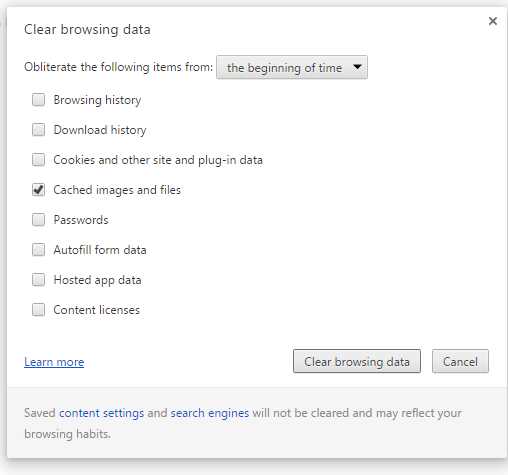
</code></p><p>Và xóa các tập tin tại đó.</p></li></ol><h3>3. Google Drive</h3><p>Để xóa bộ nhớ cache trên Google Drive, bạn thực hiện theo các bước dưới đây:<br /><u>Thủ thuật xóa bộ nhớ drive tạo tài khoản drive google one không giới hạn dung lượng</u></p><figure class="image"><img style="aspect-ratio:800/595;" src="https://bangoogledrivekhonggioihantaikhoan.com/uploads/news/2024_10/thu-thuat-xoa-bo-nho-drive-tao-tai-khoan-drive-google-one-khong-gioi-han-dung-luong-2.png" alt="Thủ thuật xóa bộ nhớ drive tạo tài khoản drive google one không giới hạn dung lượng (2)" width="800" height="595" /></figure><ol><li><p>Đầu tiên, bạn cần xóa bộ nhớ cache của Google. Để thực hiện điều này, hãy nhấn tổ hợp phím Ctrl + Shift + Del để mở cửa sổ Clear browsing data.</p><p>Một cách khác là nhấp vào biểu tượng ba dòng gạch ngang ở góc trên cùng bên phải màn hình, sau đó chọn More tools &gt; Clear browsing data.</p><p>Trong cửa sổ Clear browsing data, đánh dấu chọn vào Cached images and files, rồi nhấp chọn Clear browsing data để hoàn tất quá trình.</p></li><li>Nếu bạn gặp sự cố trong quá trình đồng bộ các tập tin trên Google Drive, hãy thoát khỏi Google Drive, sau đó di chuyển một vài tập tin trong thư mục Google Drive sang vị trí khác, khởi động lại máy tính và kiểm tra xem các tập tin đã được đồng bộ hay chưa.</li></ol>
		</div>
				<div id="author">
						<p>
				<strong>Tác giả:</strong>
				<a href="https://bangoogledrivekhonggioihantaikhoan.com/author/bientap3nguyenhuy/">bientap3nguyenhuy</a>
			</p>
						<p>
				<strong>Nguồn tin:</strong>
				quantrimang   .com
			</p>
		</div>
	</div>
	<div id="footer" class="clearfix">
		<div id="url">
			<strong>URL của bản tin này: </strong><a href="https://bangoogledrivekhonggioihantaikhoan.com/savefile/Tin-tuc/thu-thuat-xoa-bo-nho-drive-tao-tai-khoan-drive-google-one-khong-gioi-han-dung-luong-627.html" title="Thủ thuật xóa bộ nhớ drive tạo tài khoản drive google one không giới hạn dung lượng">https://bangoogledrivekhonggioihantaikhoan.com/savefile/Tin-tuc/thu-thuat-xoa-bo-nho-drive-tao-tai-khoan-drive-google-one-khong-gioi-han-dung-luong-627.html</a>

		</div>
		<div class="clear"></div>
		<div class="copyright">
			&copy; Mua Bán tài khoản Google Drive , One, Unlimited không giới hạn dung lượng
		</div>
		<div id="contact">
			<a href="mailto:webmaster@tochucteambuildingtour.com">webmaster@tochucteambuildingtour.com</a>
		</div>
	</div>
</div>
        <div id="timeoutsess" class="chromeframe">
            Bạn đã không sử dụng Site, <a onclick="timeoutsesscancel();" href="https://bangoogledrivekhonggioihantaikhoan.com/#">Bấm vào đây để duy trì trạng thái đăng nhập</a>. Thời gian chờ: <span id="secField"> 60 </span> giây
        </div>
        <div id="openidResult" class="nv-alert" style="display:none"></div>
        <div id="openidBt" data-result="" data-redirect=""></div>
<div class="hotline-float">
    <span>
        <a href="tel:0366661221">0366661221</a>
    </span> 
</div>
<div class="zalo-container right" style="bottom:380px;">
            <a id="zalo-btn" href="https://zalo.me/0366661221" target="_blank" rel="noopener noreferrer nofollow">
                                <div class="animated_zalo infinite zoomIn_zalo cmoz-alo-circle"></div>
                <div class="animated_zalo infinite pulse_zalo cmoz-alo-circle-fill"></div>
                <span><img src="https://bangoogledrivekhonggioihantaikhoan.com/themes/default/images/zalo-2.png" alt="Contact Me on Zalo"></span>
                            </a>
        </div>
<div class="zalo-container right" style="bottom:310px;">
            <a id="zalo-btn" href="https://fb.com/[FIX_BANNER_RIGHT]" target="_blank" rel="noopener noreferrer nofollow">
                                <div class="animated_zalo infinite zoomIn_zalo cmoz-alo-circle"></div>
                <div class="animated_zalo infinite pulse_zalo cmoz-alo-circle-fill"></div>
                <span><img src="https://bangoogledrivekhonggioihantaikhoan.com/themes/default/images/fb-2.png" alt="Contact Me on Zalo"></span>
                            </a>
        </div>
<script src="https://bangoogledrivekhonggioihantaikhoan.com/assets/js/jquery/jquery.min.js"></script>
<script>var nv_base_siteurl="/",nv_lang_data="vi",nv_lang_interface="vi",nv_name_variable="nv",nv_fc_variable="op",nv_lang_variable="language",nv_module_name="news",nv_func_name="savefile",nv_is_user=0, nv_my_ofs=-4,nv_my_abbr="EDT",nv_cookie_prefix="nv4",nv_check_pass_mstime=1738000,nv_area_admin=0,nv_safemode=0,theme_responsive=1,nv_recaptcha_ver=2,nv_recaptcha_sitekey="",nv_recaptcha_type="image",XSSsanitize=1;</script>
<script src="https://bangoogledrivekhonggioihantaikhoan.com/assets/js/language/vi.js"></script>
<script src="https://bangoogledrivekhonggioihantaikhoan.com/assets/js/DOMPurify/purify3.js"></script>
<script src="https://bangoogledrivekhonggioihantaikhoan.com/assets/js/global.js"></script>
<script src="https://bangoogledrivekhonggioihantaikhoan.com/assets/js/site.js"></script>
<script src="https://bangoogledrivekhonggioihantaikhoan.com/themes/default/js/news.js"></script>
<script src="https://bangoogledrivekhonggioihantaikhoan.com/themes/default/js/main.js"></script>
<script src="https://bangoogledrivekhonggioihantaikhoan.com/themes/default/js/custom.js"></script>
<script type="application/ld+json">
        {
            "@context": "https://schema.org",
            "@type": "Organization",
            "url": "https://bangoogledrivekhonggioihantaikhoan.com",
            "logo": "https://bangoogledrivekhonggioihantaikhoan.com/uploads/logo-yeye2.png"
        }
        </script>
<script src="https://bangoogledrivekhonggioihantaikhoan.com/themes/default/js/bootstrap.min.js"></script>
</body>
</html>